How to Use a TENS Unit: A Step-by-Step Guide (2026)
Updated: 5 days ago
Updated November 2026
A TENS unit is one of those devices that looks simple in the box and then raises a dozen questions the first time you hold the pads. Where do they go? How strong should it feel? How long do you leave it on? Can you use it every day?
This guide walks through how to use a TENS unit step by step, the settings you'll see on most models, the places you should never put the pads, and how to keep electrodes sticky in Houston's humidity. It's general information, not medical advice, so talk with your doctor or physical therapist about whether TENS fits your situation and how they'd like you to use it.
Key takeaways
TENS stands for transcutaneous electrical nerve stimulation. It sends mild electrical pulses through pads on the skin.
Always start at the lowest intensity and turn it up slowly until you feel a strong but comfortable tingle.
Never place pads on the front of the neck, the head, the eyes, across the chest, or on broken or numb skin.
Follow the session time in your unit's manual and the advice of your care team.
Clean, dry skin and well-cared-for pads make a big difference in comfort.
What a TENS unit is (and what it isn't)
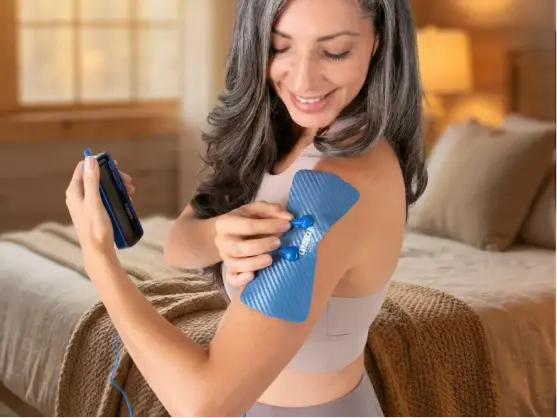
A TENS unit is a small, battery-powered device with lead wires that connect to sticky electrode pads. When it's on, it sends gentle electrical pulses through the skin. Most people describe the feeling as tingling, buzzing or tapping.
Many people use TENS as one part of a pain management plan, often alongside heat, ice, stretching or physical therapy. How well it works varies a lot from person to person, so it's worth discussing with your doctor before you buy one.
TENS is often confused with EMS (electrical muscle stimulation). Some devices do both, which is why it helps to know the difference:
TENS | EMS | |
Main purpose | Stimulates nerves under the skin | Makes muscles contract |
What it feels like | Tingling, buzzing or tapping | Muscles tightening and releasing |
Common use | Part of a pain management routine | Muscle conditioning and rehab exercises |
Combo units | Many home units offer both modes | Check which mode is selected before you start |
If you have a combination unit, make sure it's set to TENS mode before you begin.
What you need before your first session
Before you start, gather everything so you're not fumbling with wires halfway through:
Your TENS unit with charged or fresh batteries
Lead wires that click firmly into the unit
Electrode pads that are clean and still sticky
Mild soap, water and a towel to prep your skin
The instruction manual for your specific model
Read the manual's quick-start page once. Buttons and modes vary between brands, and your manual is the final word on your device.
How to use a TENS unit step by step
Here's the basic routine most home units follow:
Make sure the unit is off. Never attach or remove pads while the device is running.
Clean and dry the skin. Wash the area with mild soap and water, then dry it fully. Skip lotions and oils, since they keep pads from sticking.
Connect the lead wires to the pads. Do this before the pads go on your skin. It's easier, and you won't tug on your skin.
Place the pads. Put them on or around the area of discomfort, at least about an inch apart, and never touching each other. Follow the placement diagrams in your manual or the guidance from your therapist.
Plug the lead wires into the unit. Make sure each connection is snug.
Turn the unit on at the lowest setting. Pick your mode or program first if your unit has presets.
Increase intensity slowly. Go up one step at a time until you feel a strong but comfortable tingle. It should never be painful or make your muscles twitch hard in TENS mode.
Let the session run. Follow the session length in your manual or from your care team. Many units have a built-in timer.
Turn the unit off before removing pads. Then peel each pad off by its edge, not the wire.
Store the pads properly. Put them back on their plastic film and seal them in the bag they came in.
If the tingle fades during a session, that's common. Your body gets used to the feeling. You can nudge the intensity up slightly, but stay within a comfortable range.
Understanding the settings
Most TENS units let you adjust three main things. Presets handle this for you, but it's useful to know what you're changing:
Intensity (amplitude): How strong the pulses feel. This is the setting you'll adjust most.
Frequency (pulse rate, in Hz): How many pulses per second. Higher rates feel like a smooth buzz, lower rates feel like tapping.
Pulse width (duration): How long each pulse lasts. Wider pulses usually feel stronger and deeper.
Many units also have modes such as constant, burst or modulated. Modulated settings change the pulse pattern a little at a time, which some people find more comfortable over a full session. If you're not sure which settings to use, ask your physical therapist or doctor to write down what they'd like you to try.
Where not to put TENS pads
Pad placement depends on where you're uncomfortable, but some spots are off limits for everyone. Do not place pads:
On the front or sides of the neck
On the head, face or eyes
Across the chest, or with one pad on the front of the chest and one on the back
On broken, irritated, swollen or infected skin
On areas where you have reduced feeling or numbness
Over varicose veins or open wounds
Also avoid using a TENS unit while driving, operating machinery, sleeping, or in the bath or shower.
Who should talk to a doctor first
TENS isn't right for everyone. Check with your doctor before using one if any of these apply:
You have a pacemaker, defibrillator or another implanted electronic device
You have a heart condition
You have epilepsy or a seizure disorder
You are pregnant
You have cancer, a bleeding disorder, or a skin condition in the treatment area
Your pain is new, severe or unexplained
When in doubt, ask first. Your doctor can tell you whether TENS is a reasonable option and how to use it safely.
TENS pad care: making electrodes last
Pads are the part of a TENS setup that wears out. Good care keeps them sticky longer and the sessions comfortable:
Always put pads back on their plastic film after use.
Store them in the sealed bag, away from heat and direct sun.
If a pad starts to dry out, a drop of water on the sticky side can help, if your pad maker allows it.
Keep pads to one person. Sharing them can spread skin bacteria.
Replace pads when they no longer stick firmly or the tingle feels uneven or prickly.
Houston's heat and humidity can make pads lose their grip faster, especially if you use them after yard work or a workout. Cool down, wash the area and dry it completely before placing the pads. And don't leave your unit or pads in a hot car in a Cypress parking lot in August.
Quick checklist: is it working right?
Run through this list if a session doesn't feel right:
No sensation: Check that the unit is on, the batteries are charged, and the wires are fully plugged in.
Sensation on only one side: A wire may be loose or damaged, or a pad may have lifted.
Prickly or stinging feeling: The pad may be drying out or not fully stuck. Turn off the unit and check it.
Red skin after use: Mild redness under pads can happen and usually fades. If it lasts, or you see a rash or blisters, stop using the unit and talk to your doctor.
Muscles jumping hard: You may be in EMS mode, or the intensity is too high.
Choosing a TENS unit
When you shop for a TENS unit, look at how easy the controls are to read, whether it runs on rechargeable or standard batteries, how many channels it has (two channels let you use four pads at once), and whether it includes TENS-only or combination modes. It also helps to check that replacement pads for that model are easy to find.
We carry TENS units at both of our stores, along with back, knee, ankle and wrist braces that many people use alongside them. You can browse our orthopedics and compression socks section or our wider range of medical equipment and products. If you're recovering from a knee procedure, our guide to using an ice machine after knee surgery covers another common part of home recovery.
We accept FSA and HSA cards, and CareCredit 0% financing is available on qualifying purchases. Check with your plan administrator if you're unsure whether a specific item is eligible.
Frequently asked questions
How long should I use a TENS unit at a time?
Follow the session length in your unit's manual and any guidance from your doctor or physical therapist. Many units have a built-in timer to help you keep sessions consistent.
Can I use a TENS unit every day?
Many people use TENS regularly, but how often you should use it depends on your situation. Ask your doctor or therapist, and give your skin breaks so it doesn't get irritated under the pads.
Should a TENS unit hurt?
No. It should feel like a strong but comfortable tingle or buzz. If it hurts, stings or makes your muscles twitch hard, turn the intensity down or stop and check the pads.
Can I sleep with a TENS unit on?
No. Most manufacturers say not to use a TENS unit while sleeping, since you can't monitor your skin or the settings.
How do I know when to replace TENS pads?
Replace them when they stop sticking firmly, look dirty or dried out, or the sensation feels uneven or prickly. How long they last depends on how often you use them and how you store them.
Where can I buy a TENS unit in Houston?
Both Complete Medical Supply stores carry TENS units. Our team can show you how different models work so you can pick one that's easy for you to use at home.
Visit us in Houston or Cypress
Complete Medical Supply is a family-owned medical supply store serving the Houston area since 2007. Stop by our Heights store at 1732 W 18th Street, Houston, TX 77008, or our Cypress store at 22224 Northwest Fwy, Suite C, at 290 and Telge Rd. We're open Monday through Friday from 9 to 6 and Saturday from 10 to 5. Have a question before you visit? Contact us and we'll be glad to help.